There is a growing movement to use SQLite for everything. Kent C. Dodds
argues for defaulting to SQLite in web
development
due to its zero-latency reads and minimal operational burden. Wesley
Aptekar-Cassels makes a strong
case that SQLite works for
web apps with large user bases, provided they don’t need tens of thousands of
writes per second. Discussions on Hacker News and elsewhere cite companies
like Apple, Adobe, and Dropbox using SQLite in production. Even the official
SQLite documentation encourages its
use for most websites with fewer than 100K hits per day.
These points are fair. The overarching theme is a pushback against
automatically choosing complex, client-server databases like PostgreSQL when
SQLite is often more than sufficient, simpler to manage, and faster for the
majority of use cases. I agree with that framing. The debate has settled into
a well-understood set of tradeoffs:
| For “SQLite for everything” | Known limitations |
|---|---|
| Zero-latency reads as an embedded library | Write concurrency limited to a single writer |
| No separate server to set up or maintain | Not designed for distributed or clustered systems |
| Reliable, self-contained, battle-tested (most deployed DB in the world) | No built-in user management; relies on filesystem permissions |
| Fast enough for most human-driven web workloads | Schema migration can be more complex in large projects |
These are the terms of the current discussion. But there is an important,
often overlooked dimension missing from this framing.
SQLite struggles with complex queries. More specifically, SQLite is not
well-suited to handle the kind of multi-join queries that arise naturally in any
serious production system. This goes beyond the usual talking points about
deployment concerns (write concurrency, distribution, and so on). It points to
a system-level limitation: the query optimizer itself. That limitation matters even for
read-heavy, single-node deployments, which is exactly the use case where SQLite
is supposed to shine.
I have benchmark
evidence
showing this clearly. This post focuses on join-heavy analytical queries, not on
the many workloads where SQLite is already the right choice. But first, let me
explain why this matters more than people think.
Multi-join queries are not exotic
A common reaction to discussing multi-join queries is: “I don’t write queries
with 10 joins.” This usually means one of three things: the schema is
denormalized, the logic has been moved into application code, or the product
is simple. None of these mean the problem goes away.
In any system with many entity types, rich relationships, history or
versioning, permissions, and compositional business rules, multi-join queries
inevitably appear. They emerge whenever data is normalized and questions are
compositional. Here are concrete examples from real production systems.
Enterprise SaaS (CRM / ERP / HR). A query like “show me all open enterprise
deals” in a Salesforce-like system touches accounts, contacts, products,
pricebooks, territories, users, permissions, and activity logs. Real queries in
these systems routinely involve 10-20 joins. Every dimension of the business
(customers, ownership, products, pricing, regions, access control, activity
statistics) is often normalized into its own table.
Healthcare (EHR). “Patients with condition X, treated by doctors in
department Y, prescribed drug Z in the last 6 months, and whose insurance covers
that drug” spans patients, visits, diagnoses, providers, departments, prescriptions,
drugs, insurance plans, coverage rules, and claims. Exceeding 15 joins is
common.
E-commerce and Marketplaces. “Orders in the last 30 days that include
products from vendor V, shipped late, refunded, with customers in region R”
touches orders, order items, products, vendors, shipments, delivery events,
refunds, customers, addresses, regions, and payment methods. Again, 10+ joins.
Authorization and Permission systems. “Which documents can user U see?”
requires traversing users, groups, roles, role assignments, resource
policies, ACLs, inheritance rules, and organizational hierarchies. This
alone can be 12+ joins, sometimes recursive.
Analytics and BI. Star schemas look simple on paper, but real dashboard
queries add slowly changing dimensions, hierarchy tables, permission joins,
and attribution models. A “simple” dashboard query often hits 6-10 dimension
tables plus access control.
Knowledge graphs and semantic systems. “Papers authored by people affiliated
with institutions collaborating with company X on topic Y” requires joining
papers, authors, affiliations, institutions, collaborations, and topics.
Very common in search and recommendation systems.
Event sourcing and temporal queries. Reconstructing the state of an
account at a point in time with approval chains requires joining entity
tables, event tables, approval tables, history tables, and version joins.
Temporal dimensions multiply join counts quickly.
AI / ML feature pipelines. Feature stores generate massive joins.
Assembling a feature vector often requires joining user profiles, sessions,
events, devices, locations, and historical aggregates. This is why feature
stores are expensive.
The pattern is consistent across domains:
| Domain | Typical join count |
|---|---|
| SaaS CRM / ERP | 8-20 |
| Healthcare | 10-25 |
| Authorization | 6-15 |
| BI dashboards | 6-12 |
| Knowledge graphs | 10-30 |
| Feature pipelines | 8-20 |
Complex joins are not accidental. They emerge from normalized data, explicit
relationships, compositional business rules, layered authorization, and
historical records. Again, if you don’t see many joins in your system, it usually
means the schema is denormalized, the logic is in the application layer, or
the product hasn’t reached sufficient complexity yet. This does not mean the
system is better. It often means complexity has been pushed into the
application layer, which can add engineering cost without adding real value.
The evidence: JOB benchmark
The Join Order Benchmark
(JOB) is a standard
benchmark designed specifically to stress database query optimizers on complex
multi-join queries [1]. Based on the Internet Movie Database (IMDb), a
real-world, highly normalized dataset with over 36 million rows in its largest
table, it contains 113 analytical queries with 3 to 16 joins each, averaging
8 joins per query. Unlike synthetic benchmarks like TPC, JOB uses real data
with realistic data distributions, making it a much harder test of query
optimization.
I ran this benchmark comparing three databases: SQLite (via JDBC),
PostgreSQL 18, and Datalevin (an
open-source database I build). All were tested in default configurations
with no tuning, on a MacBook Pro M3 Pro with 36GB RAM. This is not a tuning
shootout, but a look at out-of-the-box optimizer behavior. Details of the
benchmark methodology can be found
here.
Overall wall clock time
| Database | Total time (113 queries) |
|---|---|
| Datalevin | 93 seconds |
| PostgreSQL | 171 seconds |
| SQLite | 295 seconds (excluding 9 timeouts) |
SQLite needed a 60-second timeout per query, and 9 queries failed to complete
within that limit. The actual total time for SQLite would be substantially
higher if these were included. For example, query 10c, when allowed to run to
completion, took 446.5 seconds.
Execution time statistics (milliseconds)
| Database | Mean | Median | Min | Max |
|---|---|---|---|---|
| Datalevin | 773 | 232 | 0.2 | 8,345 |
| PostgreSQL | 1,507 | 227 | 3.5 | 36,075 |
| SQLite | 2,837 | 644 | 8.1 | 37,808 |
The median tells the story: SQLite’s median is nearly 3x worse than
the other two.
Per-query speedup: Datalevin vs. SQLite
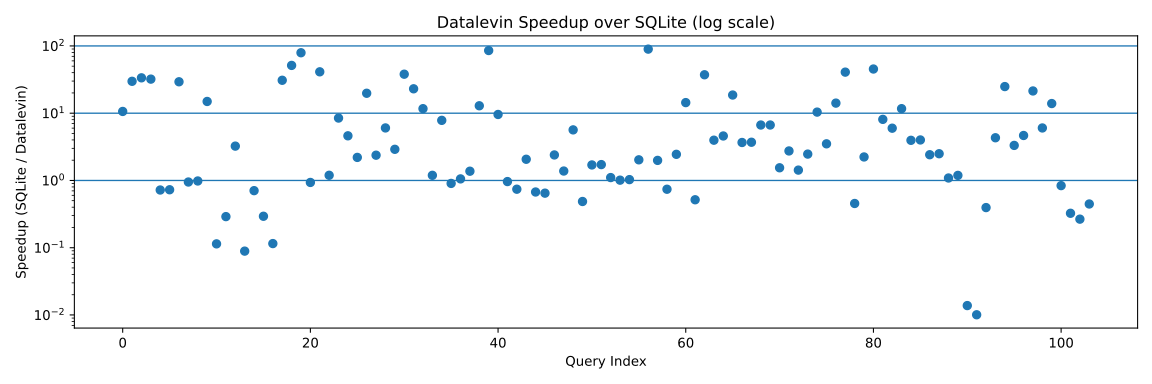
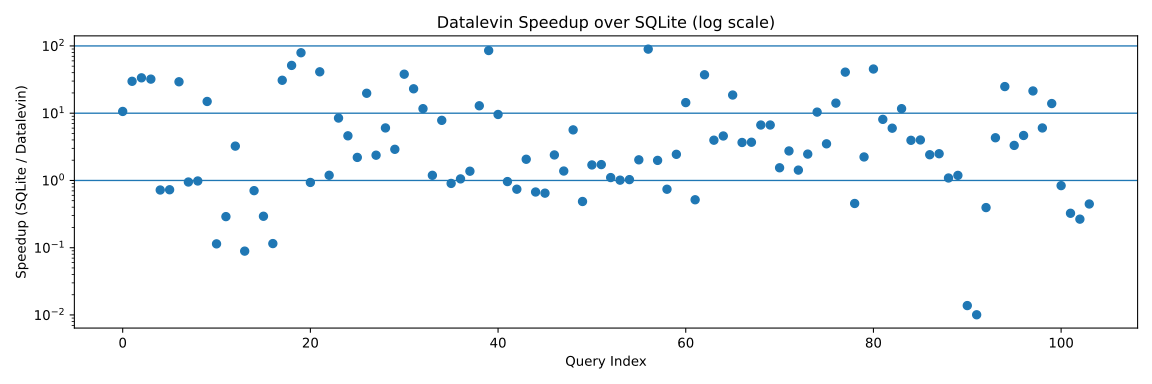
The chart at the top of this post shows the speedup ratio (SQLite time /
Datalevin time) for each of the queries on a logarithmic scale (excluding 9 timeouts). Points
above the 1x line (10^0) mean Datalevin is faster; points below mean SQLite
is faster. The horizontal lines mark 1x, 10x, and 100x speedups.
Several patterns stand out:
- The vast majority of points are above the 1x line, often by 10x or more.
- For the hardest queries, Datalevin achieves 100x+ speedups. These are
precisely the complex multi-join queries where SQLite’s optimizer breaks
down. - SQLite is rarely faster, and when it is, the margin is small.
- The 9 timed-out queries (not shown) would push the ratio even higher.
Where SQLite breaks down
Timeouts. Queries 8c, 8d, 10c, 15c, 15d, 23a, 23b, 23c, and 28c
all timed out at the 60-second limit during the benchmark runs. These
represent queries with higher join counts where SQLite’s optimizer failed
to find an efficient plan.
Extreme slowdowns. Even among queries that completed, SQLite was often
dramatically slower. Query 9d took 37.8 seconds on SQLite versus 1.6 seconds
on Datalevin (24x). Query 19d took 20.8 seconds versus 5.7 seconds. Query
families 9, 10, 12, 18, 19, 22, and 30 all show SQLite performing
significantly worse, often by 10-50x.
Why SQLite falls behind
SQLite’s query optimizer has fundamental limitations for complex joins:
-
Limited join order search. SQLite uses exhaustive search for join
ordering only up to a limited number of tables. Beyond that threshold, it
falls back to heuristics that produce poor plans for complex queries. -
Weak statistics model. SQLite’s cardinality estimation is simpler than
PostgreSQL’s, which itself has well-documented weaknesses [1]. With fewer
statistics to guide optimization, SQLite makes worse choices about which
tables to join first and which access methods to use. -
No cost-based plan selection for complex cases. For queries with many
tables, SQLite’s planner cannot explore enough of the plan space to find
good join orderings. The result is plans that process orders of magnitude
more intermediate rows than necessary.
These limitations are architectural; they are not bugs likely to be fixed in a
near-term release. They reflect design tradeoffs inherent in SQLite’s goal of
being a lightweight, embedded database.
What this means for “SQLite in production”
SQLite is excellent for what it was designed to be: an embedded database for
applications with simple query patterns. It excels as a local data store, a
file format, and a cache. For read-heavy workloads with straightforward
queries touching a few tables, it works extremely well.
But the production systems described above, e.g. CRM, EHR, e-commerce,
authorization, analytics, are precisely where SQLite’s query optimizer
becomes a bottleneck. These are not hypothetical workloads, but the
day-to-day reality of systems that serve businesses and users.
The “SQLite in production” advocates often benchmark simple cases: key-value
lookups, single-table scans, basic CRUD operations. On those workloads, SQLite
does extremely well. But production systems grow. Schemas become more normalized as
data integrity requirements increase. Questions become more compositional as
business logic matures. And at that point, the query optimizer becomes the
bottleneck, not the network round trip to a database server.
Before choosing SQLite for a production system, ask: will our queries stay
simple forever? If the answer is no, and it usually is, the savings in
deployment simplicity may not be worth the cost in query performance as the
system grows.
An alternative approach
In a previous
post,
I described how Datalevin, a triplestore using Datalog, handles these complex
queries effectively. Its query optimizer uses counting and sampling on its
triple indices to produce accurate cardinality estimates, resulting in
better execution plans. Unlike row stores, where cardinality estimation is
notoriously difficult due to bundled storage, a triplestore can count and
sample individual data atoms directly.
This approach yields plans that are not only better than SQLite’s, but
consistently better than PostgreSQL’s across the full range of JOB queries.
Despite Datalevin being written in Clojure on the JVM rather than optimized C code,
it still managed to halve the total query time in the JOB benchmark. The quality of the
optimizer’s decisions matters more than the raw execution speed of the engine.
For systems that need both deployment simplicity (Datalevin works as an
embedded database too) and the ability to handle complex queries as they
inevitably arise, a triplestore with a cost-based optimizer offers a practical
alternative to either SQLite or a full client-server RDBMS. It is not a silver
bullet, but it can deliver SQLite-like operational simplicity without giving
up complex-query performance.
If you have different results or have tuned SQLite to handle these queries
well, I would love to compare notes. The goal here is not to dunk on SQLite,
but to surface a missing dimension in a discussion that often defaults to
deployment tradeoffs alone.
References
[1] Leis, V., et al. “How good are query optimizers, really?” VLDB
Endowment. 2015.