Tagged as lisp, clim, mcclim, gui, tutorial
Written on 2026-01-26 by Daniel Kochmański
For the last two months I’ve been polishing the upcoming release of
McCLIM. The most notable change is
the rewriting of the input editing and accepting-values abstractions. As it
happens, I got tired of it, so as a breather I’ve decided to tackle something I
had in mind for some time to improve the McCLIM manual – namely the
7GUIs: A GUI Programming Benchmark.
This challenge presents seven distinct tasks commonly found in graphical
interface requirements. In this post I’ll address the first challenge – The
Counter. It is a fairly easy task, a warm-up of sorts. The description states:
Challenge: Understanding the basic ideas of a language/toolkit.
The task is to build a frame containing a label or read-only textfield T and a
button B. Initially, the value in T is “0” and each click of B increases the
value in T by one.Counter serves as a gentle introduction to the basics of the language, paradigm
and toolkit for one of the simplest GUI applications imaginable. Thus, Counter
reveals the required scaffolding and how the very basic features work together
to build a GUI application. A good solution will have almost no scaffolding.
In this first post, to make things more interesting, I’ll solve it in two ways:
- using contemporary abstractions like layouts and gadgets
- using CLIM-specific abstractions like presentations and translators
In CLIM it is possible to mix both paradigms for defining graphical interfaces.
Layouts and gadgets are predefined components that are easy to use, while using
application streams enables a high degree of flexibility and composability.
First, we define a package shared by both versions:
(eval-when (:compile-toplevel :load-toplevel :execute)
  (unless (member :mcclim *features*)
    (ql:quickload "mcclim")))

(defpackage "EU.TURTLEWARE.7GUIS/TASK1"
  (:use  "CLIM-LISP" "CLIM" "CLIM-EXTENSIONS")
  (:export "COUNTER-V1" "COUNTER-V2"))
(in-package "EU.TURTLEWARE.7GUIS/TASK1")
Note that “CLIM-EXTENSIONS” package is McCLIM-specific.
Assuming that we are interested only in the functionality and we are willing to
ignore the visual aspect of the program, the definition will look like this:
(define-application-frame counter-v1 ()
  ((value :initform 0 :accessor value))
  (:panes
   ;;      v type v initarg
   (tfield :label :label (princ-to-string (value *application-frame*))
                  :background +white+)
   (button :push-button :label "Count"
                        :activate-callback (lambda (gadget)
                                             (declare (ignore gadget))
                                             (with-application-frame (frame)
                                               (incf (value frame))
                                               (setf (label-pane-label (find-pane-named frame 'tfield))
                                                     (princ-to-string (value frame)))))))
  (:layouts (default (vertically () tfield button))))

;;; Start the application (if not already running).
;; (find-application-frame 'counter-v1)
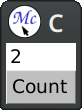
The macro define-application-frame is like defclass with additional clauses.
In our program we store the current value as a slot with an accessor.
The clause :panes is responsible for defining named panes (sub-windows). The
first element is the pane name, then we specify its type, and finally we specify
initargs for it. Panes are created in a dynamic context where the application
frame is already bound to *application-frame*, so we can use it there.
The clause :layouts allows us to arrange panes on the screen. There may be
multiple layouts that can be changed at runtime, but we define only one. The
macro vertically creates another (anonymous) pane that arranges one gadget
below another.
Gadgets in CLIM operate directly on top of the event loop. When the pointer
button is pressed, it is handled by activating the callback, that updates the
frame’s value and the label. Effects are visible immediately.
Now if we want the demo to look nicer, all we need to do is to fiddle a bit with
spacing and bordering in the :layouts section:
(define-application-frame counter-v1 ()
  ((value :initform 0 :accessor value))
  (:panes
   (tfield :label :label (princ-to-string (value *application-frame*))
                  :background +white+)
   (button :push-button :label "Count"
                        :activate-callback (lambda (gadget)
                                             (declare (ignore gadget))
                                             (with-application-frame (frame)
                                               (incf (value frame))
                                               (setf (label-pane-label (find-pane-named frame 'tfield))
                                                     (princ-to-string (value frame)))))))
  (:layouts (default
             (spacing (:thickness 10)
              (horizontally ()
                (100
                 (bordering (:thickness 1 :background +black+)
                   (spacing (:thickness 4 :background +white+) tfield)))
                15
                (100 button))))))

;;; Start the application (if not already running).
;; (find-application-frame 'counter-v1)
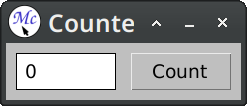
This gives us a layout that is roughly similar to the example presented on the
7GUIs page.
Unlike gadgets, stream panes in CLIM operate on top of the command loop. A
single command may span multiple events after which we redisplay the stream to
reflect the new state of the model. This is closer to the interaction type found
in the command line interfaces:
  (define-application-frame counter-v2 ()
    ((value :initform 0 :accessor value))
    (:pane :application
     :display-function (lambda (frame stream)
                         (format stream "~d" (value frame)))))

  (define-counter-v2-command (com-incf-value :name "Count" :menu t)
      ()
    (with-application-frame (frame)
      (incf (value frame))))

;; (find-application-frame 'counter-v2)
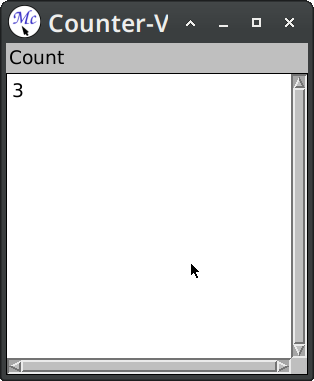
Here we’ve used :pane option this is a syntactic sugar for when we have only
one named pane. Skipping :layouts clause means that named panes will be
stacked vertically one below another.
Defining the application frame defines a command-defining macro. When we define
a command with define-counter-v2-command, then this command will be inserted
into a command table associated with the frame. Passing the option :menu t
causes the command to be available in the frame menu as a top-level entry.
After the command is executed (in this case it modifies the counter value), the
application pane is redisplayed; that is a display function is called, and its
output is captured. In more demanding scenarios it is possible to refine both
the time of redisplay and the scope of changes.
Now we want the demo to look nicer and to have a button counterpart placed
beside the counter value, to resemble the example more:
(define-presentation-type counter-button ())

(define-application-frame counter-v2 ()
  ((value :initform 0 :accessor value))
  (:menu-bar nil)
  (:pane :application
   :width 250 :height 32
   :borders nil :scroll-bars nil
   :end-of-line-action :allow
   :display-function (lambda (frame stream)
                       (formatting-item-list (stream :n-columns 2)
                         (formatting-cell (stream :min-width 100 :min-height 32)
                           (format stream "~d" (value frame)))
                         (formatting-cell (stream :min-width 100 :min-height 32)
                           (with-output-as-presentation (stream nil 'counter-button :single-box t)
                             (surrounding-output-with-border (stream :padding-x 20 :padding-y 0
                                                                     :filled t :ink +light-grey+)
                               (format stream "Count"))))))))

(define-counter-v2-command (com-incf-value :name "Count" :menu t)
    ()
  (with-application-frame (frame)
    (incf (value frame))))

(define-presentation-to-command-translator act-incf-value
    (counter-button com-incf-value counter-v2)
    (object)
  `())

;; (find-application-frame 'counter-v2)
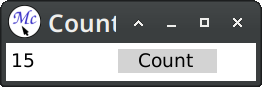
The main addition is the definition of a new presentation type counter-button.
This faux button is printed inside a cell and surrounded with a background.
Later we define a translator that converts clicks on the counter button to the
com-incf-value command. The translator body returns arguments for the command.
Presenting an object on the stream associates a semantic meaning with the
output. We can now extend the application with new gestures (names :scroll-up
and :scroll-down are McCLIM-specific):
(define-counter-v2-command (com-scroll-value :name "Increment")
    ((count 'integer))
  (with-application-frame (frame)
    (if (plusp count)
        (incf (value frame) count)
        (decf (value frame) (- count)))))

(define-presentation-to-command-translator act-scroll-up-value
    (counter-button com-scroll-value counter-v2 :gesture :scroll-up)
    (object)
  `(10))

(define-presentation-to-command-translator act-scroll-dn-value
    (counter-button com-scroll-value counter-v2 :gesture :scroll-down)
    (object)
  `(-10))

(define-presentation-action act-popup-value
    (counter-button nil counter-v2 :gesture :describe)
    (object frame)
  (notify-user frame (format nil "Current value: ~a" (value frame))))
A difference between presentation to command translators and presentation
actions is that the latter does not automatically progress the command loop.
Actions are often used for side effects, help, inspection etc.
In this short post we’ve solved the first task from the 7GUIs challenge. We’ve
used two techniques available in CLIM – using layouts and gadgets, and using
display and command tables. Both techniques can be combined, but differences are
visible at a glance:
- gadgets provide easy and reusable components for rudimentary interactions
- streams provide extensible and reusable abstractions for semantic interactions
This post only scratched the capabilities of the latter, but the second version
demonstrates why the command loop and presentations scale better than
gadget-only solutions.
Following tasks have gradually increasing level of difficulty that will help us
to emphasize how useful are presentations and commands when we want to write
maintainable applications with reusable user-defined graphical metaphors.