Did you know…?
LWN.net is a subscriber-supported publication; we rely on subscribers
to keep the entire operation going. Please help out by buying a subscription and keeping LWN on the
net.
In traditional build tools like Make, targets and dependencies are always
files. Imagine if you could specify an entire tree (directory) as a
dependency: You could exhaustively specify a “build root” filesystem containing
the toolchain used for building some target as a dependency of that target.
Similarly, a rule that creates that build root would have the tree as its
target.
Using Merkle
trees as first-class citizens in a build system gives great
flexibility and many optimization opportunities. In this article I’ll
explore this idea using OSTree,
Ninja, and Python.
OSTree
OSTree is like Git, but for
storing entire filesystem images such as a complete Linux system. OSTree
stores more metadata about its files than Git does: ownership, complete
permissions (Git only remembers whether or not a file is executable), and
extended
attributes (“xattrs”). Like Git, it doesn’t store
timestamps. OSTree is used by Flatpak,
rpm-ostree from Project Atomic/CoreOS, and GNOME
Continuous, which is
where OSTree was born.
My company has been using
OSTree to build and roll-out software updates to Linux-based devices
for the last four years. OSTree provides deployment tools for distributing
images to different machines, deploying or rolling back an image
atomically, managing changes to /etc, and so on, but in this article
I’ll focus on using OSTree for its data model.
Like Git, OSTree stores files in a “Content
Addressable Store”, which means that you can retrieve the contents of
a file if you know the checksum of those contents. OSTree uses SHA-256, but I will use
“SHA” and “checksum” interchangeably. This store or
“repository” is a directory in the filesystem (for example
“ostree/“) where each file tracked by OSTree (a
“blob” in Git terminology) is stored under
ostree/objects/ as a file whose filename is the SHA of its
contents. This is something of a simplification because file ownership, permissions, and xattrs
are also reflected in the checksum.
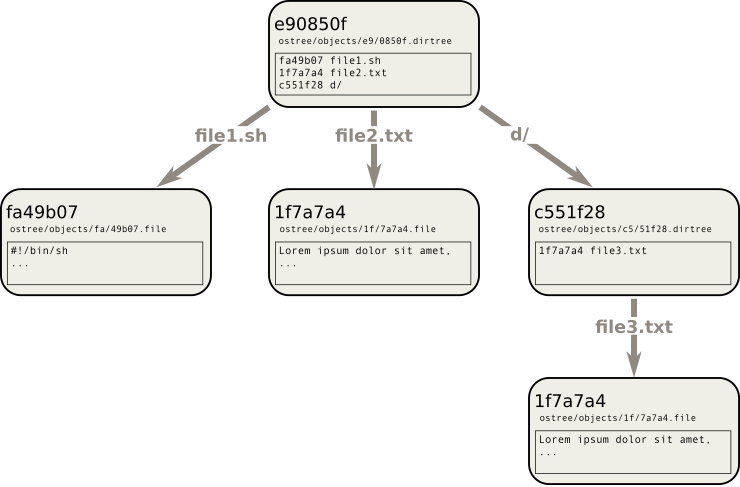
A “tree” (directory) is stored as a file that contains a list of files and
sub-trees, and their SHAs. The filename of this file, just like for blobs, is
the SHA of its contents. This way the entire tree, including its sub-trees and
their sub-trees, and the contents of each of the files within, can be uniquely
identified by a single SHA. This data structure is called a Merkle tree.
![[Merkle tree for OSTree]](https://static.lwn.net/images/2020/ninja-ost-ostree-objects.png "A Merkle tree, as implemented by OSTree (some details omitted)")
You can have different versions of a tree, like Git commits or Git
branches, or completely separate trees, but any common files are stored
only once in the OSTree repository (in the figure above, file2.txt
and d/file3.txt are identical so they are stored only once in
ostree/objects/). Like Git, OSTree has “commit” and
“checkout” operations.
OSTree “refs” (short for
“references”), similar to Git refs, are how OSTree implements
branches and tags. A ref is a metadata file in the OSTree repository: Its
filename is whatever you want it to be, such as the branch or tag name, and its
content is a single SHA pointing at a tree. The connection to the tree is
indirect as it is really the
SHA of a “commit” which in turn points at a tree, but in this
article I’ll ignore commits as they aren’t directly relevant.
OSTree + Ninja
Ninja is a build system similar
to Make. I covered Ninja for LWN three years ago. Unlike Make,
Ninja doesn’t support wildcards or loops, so you’re supposed to write a
“configure” script to generate a Ninja file that specifies each
build target explicitly. At my company, the internal build system is a
3,000-line Python file, plus several dozen YAML files with packaging instructions for
various components; when run, this Python script generates a 90,000-line
Ninja file.
In Ninja (like Make) build targets and inputs are files. OSTree refs are
also files. The build system, then, creates a different ref for each build
step, and the ref itself is the target (output) of that build rule. For
example, the target of a generated Ninja rule might be the file
“build/ostree/refs/heads/xyz“, where “build/ostree” is
the OSTree repository in the “build” output directory, and
“xyz” is the ref name.
Here’s a concrete example from the build system, where it builds a rootfs for
the Linux devices:
    rootfs = ostree_combine([
        l4t_kernel(),
        bionic_userspace(),
        package("a"),
        package("b"),
        container("c"),
    ])
    phony("rootfs", rootfs)
    default(rootfs, ...)
Each of l4t_kernel(), bionic_userspace(),
package(), and container() is a Python function that creates
an OSTree tree (perhaps by downloading and unpacking a tarball, or by
running an upstream makefile, the details don’t matter right now), then
creates an OSTree ref pointing at this tree, and returns the ref (which is
a Python string generated internally, perhaps
“build/ostree/refs/heads/package/a“).
ostree_combine() is a Python function that takes any number of
OSTree refs, each of which points at a tree; it combines them
together into a single tree, creates another ref pointing at this tree, and
returns the ref (this time it might be called
“build/ostree/refs/heads/ostree_combine/c85e333f577b“).
But I lie — these functions don’t do any of this at all. What they
do do, is write a Ninja rule, that when invoked via
ninja, will carry out those steps.
When you run ninja in an incremental build, if any of the input refs changes
— remember, a ref contains a SHA pointing at a tree, so if any file in the
tree changes then the ref’s content will change — then Ninja will know that
the rootfs target is out of date and the ostree_combine rule needs to be
re-run.
Crucially, you never need to write out any of these ref filenames explicitly in
the build script; you pass them around like any normal Python variable, and
other functions can take them and record them as dependencies in their own
Ninja rules.
In the example above we also create a Ninja phony
rule to create a top-level target name that is convenient to type at the
ninja command line, and we add it to Ninja’s list of default
targets.
Benefits
The ability to specify entire trees as build dependencies or targets
means that the same mechanism can be used for specifying
coarse-grained dependencies (such as third-party packages that are being
integrated into the rootfs) as for fine-grained dependencies (individual
files). One obvious benefit is that toolchains and
build environments can be managed explicitly: The rule to compile something can
take a “build root” rootfs as one of its dependencies, and chroot
into it to run the compilation command (some literature calls this “hermetic
builds“). This build rootfs can itself be created by other
rules.
Less obvious, but possibly the best thing about this approach, is the
ability to pass intermediate build outputs around as
variables. We saw an example in the Python snippet earlier, where
package("a") returns a target name that we passed into
another rule, ostree_combine(). This means you don’t have to come
up with a name for every single intermediate artifact; you can generate
them automatically. The composability leads to concise and readable
build scripts: the example above is not at all contrived, it is very
similar to the production build script. By making this easy to express,
it is easier to exploit opportunities to cache or parallelize steps in
the build.
To provide a (somewhat contrived) example: Generating the ldconfig cache only
depends on the contents of a few directories like /lib and /usr/lib;
similarly, the mandb cache only depends on the contents of
/usr/share/man.
![[Serial vs. parallel builds]](https://static.lwn.net/images/2020/ninja-ost-ldconfig-and-mandb.png "Traditional serial build (left); parallel cacheable operations (right).")
Traditionally, these operations are run in series. But a build system
that can define a dependency that is a subtree of a previous
target, could specify separate rules for these operations, run them in
parallel, and then merge the results back into a final rootfs tree. In
this example, even if the rootfs SHA changes, it’s possible that the
/usr/share/man subtree hasn’t changed, so there’s no need to
re-run mandb. In the diagram above, red arrows operate on data
(file contents); green arrows operate on OSTree metadata.
[Update (added paragraph)]
You can imagine there are applications of this to “cloud” build systems
that farm out the execution of individual build steps to remote build
servers: To run this mandb rule, a remote server doesn’t need to
download the entire rootfs, only /usr/share/man. Merging the output
from this build step back into the rootfs can be done by operating solely on
Merkle tree metadata.
OSTree’s tooling also gives a few compelling benefits that really need
to be pointed out, but you can get them by exporting (committing) the final
build artifacts to an OSTree repository (you don’t need the close OSTree
integration, throughout the intermediate build steps, that I have been
describing):
-
Visibility of changes: My company’s continuous integration (CI)
system runs ostree diff on each pull request, so that the developers can see
exactly which files changed in the output rootfs. This is a wonderful tool
for gaining confidence in the correctness of the incremental
builds. -
Fast incremental deployment: OSTree provides tools
for deploying a tree to a remote device. This is used to deploy changes to
devices in the field (“over the air” software updates) but this
same, production software update process is fast enough for interactive
development (an incremental build + deploy + reboot in under a
minute).
Implementation details
Our Python script has various functions for getting files, tarballs, Git
snapshots, and apt packages into OSTree. A tree can consist of as little as
a single file, and refs are cheap.
There are also various functions to manipulate trees, such as
ostree_combine() in the example above, but also
ostree_ln(), ostree_mkdir(), and
ostree_mv(). These are fast because they operate directly on
OSTree metadata; they don’t need to do ostree checkout to
manipulate the trees. Note that a ref can point to any tree, it doesn’t
have to be rooted at the “/” of your final image.
To run a command, such as a compilation, there is ostree_mod(),
which modifies a tree by running a given command. It will check out the
specified tree, optionally chroot into it, run the specified command, and
create a new tree from the output. For example:
    ostree_mod(
        input_tree=ostree_combine([build_root, src]),
        command="make -C /src install DESTDIR=/dest",
        chroot=True,
        capture_output_subdir="/dest")
This uses fakeroot
and bubblewrap to
sandbox the command so that it can’t access anything outside of the input
tree. Bubblewrap is a tool born from Red Hat’s
Project Atomic, and used by Flatpak among others, that allows
unprivileged users to create secure sandboxes. Here bubblewrap is not used for security,
but as a convenient way of ensuring correct, “hermetic”
builds. Our version of fakeroot is heavily
patched so that the build command sees the file permissions that are
stored by OSTree; this allows us to run the build as an unprivileged user
but still modify root-owned files.
OSTree’s “bare” repository format is used, which means that the
checkout operation only needs to create hard-links to the relevant files
inside the repository; this needs to be fast because every build rule
that calls ostree_mod() involves an ostree checkout and an
ostree commit. OverlayFS is used to
ensure that the OSTree repository is not modified by accident via those
hard-links. This
patch for bubblewrap is needed to support OverlayFS; the patch probably isn’t
upstreamable because it requires additional capabilities, which is at odds
with the bubblewrap project’s security goals. There are also several OSTree
patches, some of which are merged and some not (yet).
apt2ostree
apt2ostree is a
tool that has been extracted from our build system. It builds a
Debian/Ubuntu rootfs from a list of .deb packages — much like
debootstrap or multistrap. Unlike those tools, the output is an OSTree tree
rather than a normal directory. It is faster, parallelized, and
incremental. It also records package versions in a “lockfile” for
reproducible builds.
From a list of .deb package names, apt2ostree downloads and unpacks each
package into its own OSTree tree, then it combines these into a single tree
(so far this is equivalent to debootstrap’s “stage 1”). It then
checks out the tree, runs dpkg --configure -a within a
chroot (“stage 2”), and commits the result to OSTree.
![[apt2ostree stages]](https://static.lwn.net/images/2020/ninja-ost-apt2ostree.png "apt2ostree stages 1 & 2")
From a list of packages, apt2ostree performs dependency resolution (via
aptly) and generates a
“lockfile” that contains the complete list of all packages, their
versions, and their SHAs. This lockfile can be committed to Git. Builds from
the lockfile are functionally reproducible.
“Stage 1” of apt2ostree is fast for several reasons. It only
downloads and extracts any given package once; if it is used in multiple
images it doesn’t need to be extracted again. This saves disk space too,
because the contents of the packages are committed to OSTree so they will share
disk space with the built images. Downloading and extracting is
done in a separate Ninja rule per package; this allows parallelism (it can be downloading
one package at the same time as compiling a second image, or performing other
build tasks within the larger build system, all thanks to Ninja) and
incremental builds (there is no need to repeat work if the package version hasn’t
changed). Combining the contents of the packages is fast because it only
touches OSTree metadata.
apt2ostree only has a single user as far as I know (my company’s build
system). See the README file in the apt2ostree repository
on GitHub for more information. I don’t necessarily expect anyone to use
it, but it serves as a good self-contained example of the techniques
described in this article.
Conclusions and
acknowledgments
We have found that OSTree and Ninja work very well together, thanks to a
neat hack: Using a “ref” (a file in the OSTree metadata
directory) as the target or dependency of a Ninja rule, to track changes to
an entire tree. But most important, I think, is the idea of trees
as first-class citizens in a build system. For researchers, OSTree and
Ninja provide an easy way to explore these ideas. For production, we have
also found OSTree and Ninja to work fantastically well for our use case:
system integrators building container images and rootfs images for embedded
Linux devices.
Most of these ideas (the good ones, at least) are
from my colleague William Manley, who also did most of the implementation
of the build system. I merely wrote it up.